TubeSEO - Best YouTube SEO Keywords Research Tools
YouTube Video Optimization Checklist : Before, During & After Upload
The complete YouTube video optimization checklist for 2026. Every step you need before filming, during upload, and after publishing to maximize views and rankings.
YOUTUBE SEOFREE SEO KEYWORD RESEARCH TOOLSTUBESEO - SEO KEYWORDS RESEARCH TOOLS
Paul
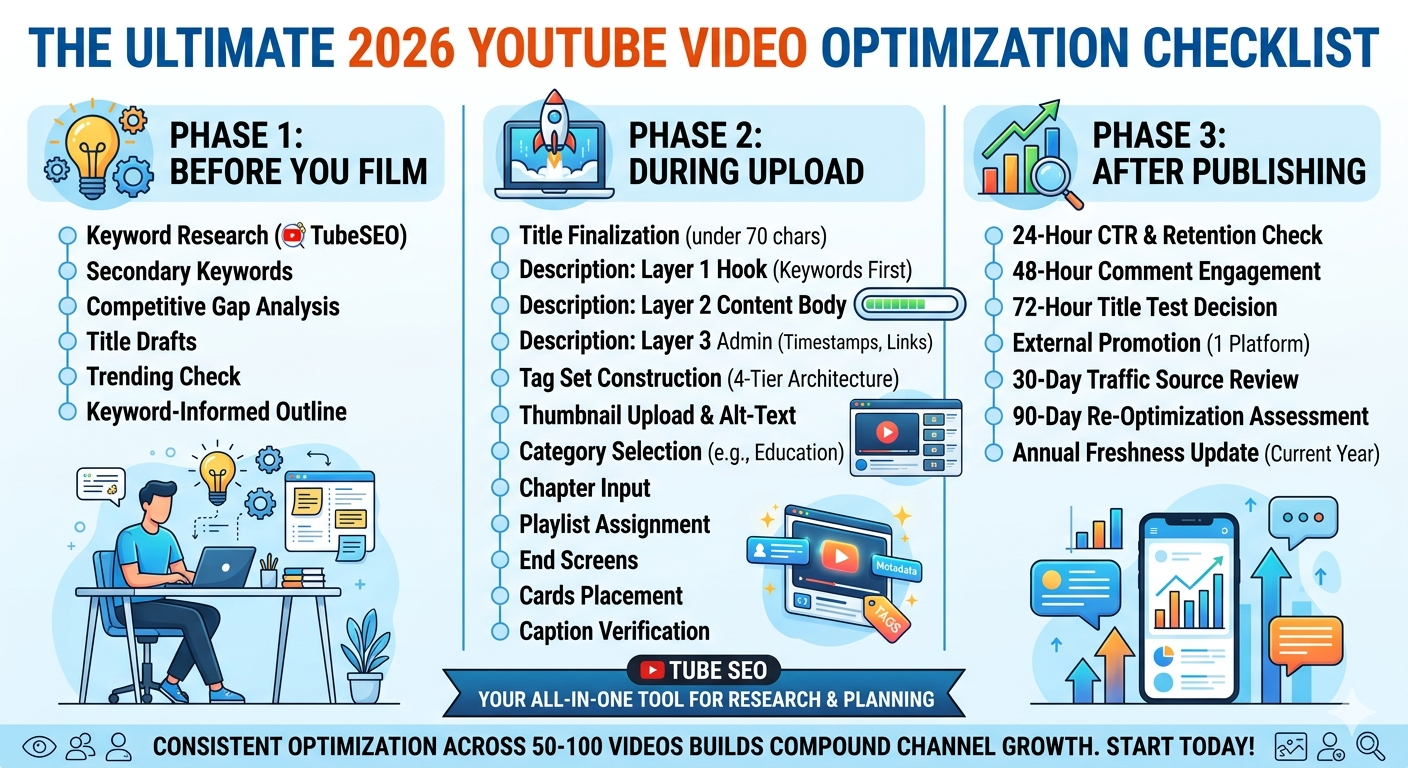
The difference between a YouTube video that grows a channel and one that disappears into obscurity is rarely production quality — it is the completeness and precision of the optimization applied before, during, and after the upload. Creators who follow a rigorous optimization checklist for every video they publish build a compound advantage that grows with each video added to their library. Creators who optimize casually and inconsistently produce a mixed bag of results that never compounds into predictable, growing channel performance.
This guide is the definitive YouTube video optimization checklist for 2026 — a complete, phase-by-phase reference document covering every optimization action that contributes meaningfully to a video’s search rankings, click-through rate, audience retention, and long-term discovery performance. It is organized into three distinct phases — before filming, during upload, and after publishing — so that every optimization action is taken at the right point in the production workflow rather than retrofitted awkwardly at the wrong stage.
Bookmark this guide and use it as a reference for every video you produce. Completeness and consistency applied over 50 to 100 videos compounds into the kind of channel-level SEO foundation that no individual optimization hack can produce in isolation.
Phase 1: Before You Film (The Research and Planning Phase)
The most important optimization decisions happen before the camera is ever turned on. This phase is where keyword research, competitive intelligence, and content planning combine to determine whether a video will generate meaningful search traffic or not — and no amount of post-production optimization can fully compensate for weaknesses created by skipping or rushing through this phase.
Checklist Item 1: Primary Keyword Research in TubeSEO
Open TubeSEO’s Keyword Research module and search the broad topic of your planned video. Evaluate the results against three criteria: monthly search volume (target 3,000 to 100,000 for growing channels), trend direction (positive or neutral preferred), and keyword specificity (the query should be specific enough that one video can fully satisfy the search intent). Document your primary keyword before proceeding.
Time required: 10 to 15 minutes. Non-negotiable — do not film before completing this step.
Checklist Item 2: Secondary Keyword Collection
From TubeSEO’s related keyword suggestions for your primary keyword, collect three to five secondary keywords that cover adjacent aspects of the same topic. These secondary keywords will populate your description, guide your spoken content, and feed your tag set. Document them alongside your primary keyword.
Time required: 5 minutes.
Checklist Item 3: Competitive Gap Assessment
Search your primary keyword on YouTube and review the top five results. For each, note the video’s approximate length, the angle it takes, the production style, and any obvious gaps in coverage — topics it does not address, audiences it does not serve, or questions it leaves unanswered. Your video should specifically address one or more of these gaps to differentiate it from existing results rather than replicating them.
Time required: 10 to 15 minutes.
Checklist Item 4: Video Title Draft (Three Versions)
Using your primary keyword and the competitive gap insight from Item 3, write three distinct title drafts. Each should contain the primary keyword within the first 50 to 60 characters, use a different structural formula (how-to, numbered list, curiosity gap, outcome-first), and stay under 70 characters total. You will select the final title during upload, but having three candidates allows comparison and testing.
Time required: 10 minutes.
Checklist Item 5: Trending Topic Intersection Check
Open TubeSEO’s Google Trending Search (Live) monitor and spend three minutes checking whether any currently trending topics intersect with your planned video’s keyword. If a relevant trend is active, consider whether a small angle adjustment to your video can capture both the evergreen keyword demand and the trending topic’s current spike — without compromising the video’s core value for the primary keyword audience.
Time required: 3 to 5 minutes.
Checklist Item 6: Content Outline Built Around Keywords
Write a content outline for your video that specifically places your primary keyword in the opening 30 seconds of spoken content, incorporates secondary keywords naturally at relevant points in the video structure, and organizes the content to maximally address the search intent identified in Item 1. A structured outline is both a production guide and an SEO tool — it ensures that your spoken content reinforces the keyword strategy you have built in your metadata.
Time required: 15 to 20 minutes.
Phase 2: During Upload (The Metadata Optimization Phase)
This phase covers every optimization action that takes place within YouTube Studio during the upload process. It is where your research from Phase 1 is translated into the actual metadata that YouTube’s algorithm reads to rank, categorize, and distribute your video.
Checklist Item 7: Title Finalization
Select the strongest of your three title drafts from Phase 1. Confirm that the primary keyword appears within the first 50 to 60 characters, the total character count is under 70, and the title contains at least one specificity signal (year, number, or qualifier) and one emotional trigger (curiosity gap, outcome statement, or social proof). Copy the final title into YouTube Studio’s title field.
Checklist Item 8: Video Description — Layer 1 (The Keyword Hook)
Write the first three lines of your description: begin with the primary keyword in your very first sentence (not “In this video” — start with the keyword itself), write 125 to 150 total characters for these opening lines, and ensure the opening fully appears in the search result preview without requiring the viewer to click “show more.” These opening lines are your description’s most valuable SEO and conversion real estate.
Checklist Item 9: Video Description — Layer 2 (The Content Body)
Write 200 to 300 words summarizing the video’s key points, naturally incorporating each of your secondary keywords at relevant points in the text. Do not force keywords — write genuinely useful content summary and allow the keywords to appear in the context they would naturally occupy. Include your target audience description and a clear statement of what the viewer will learn or be able to do after watching.
Checklist Item 10: Video Description — Layer 3 (The Administrative Section)
Add your chapter timestamps (required for any video over five minutes), a link to the most related video in your channel library with a brief description of what it covers, your website or tool link with a specific benefit statement (not just the URL alone), and any required affiliate disclosures. Close with a subscribe CTA that references specific future content rather than a generic “subscribe for more videos.”
Checklist Item 11: Tag Set Construction
Build your tag set following the four-tier architecture: exact primary keyword first, three to four close variations second (using TubeSEO’s related keyword suggestions as your source), two to three broad topic tags third, and one brand tag last. Target 8 to 12 total tags. Confirm that no tag is a single word and that the total tag character count stays below 400 to avoid the appearance of stuffing.
Checklist Item 12: Thumbnail Upload and Alt-Text Review
Upload your custom thumbnail (minimum 1280 by 720 pixels, under 2MB, in JPEG or PNG format). Before confirming, view the thumbnail at reduced size in your browser to verify it is compelling and readable at the small display size viewers see in search results. If you have alt-text capability in your creator tools, add a brief descriptive alt-text that includes your primary keyword.
Checklist Item 13: Category Selection
Select the most accurate and specific YouTube category available for your content. Avoid defaulting to “People & Blogs” for educational content — select “Education” or “Howto & Style” as appropriate. Category accuracy is a minor but real algorithmic signal for content classification.
Checklist Item 14: Chapter Timestamp Input
Add chapter timestamps to your description in the correct format (0:00 Chapter Title, 1:23 Chapter Title, etc.) for each major section of your video. Name each chapter with a keyword-informed title that describes the specific content of that section. Chapters must begin with a 0:00 timestamp and must have at least three chapters to enable the chapters feature in YouTube’s interface.
Checklist Item 15: Playlist Assignment
Before publishing, assign the video to every relevant playlist in your channel library. Create a new playlist if no existing playlist covers the video’s keyword cluster and there are two or more videos in that cluster. Playlist assignment immediately after publish maximizes the session watch time benefits of playlist viewing from the moment the video goes live.
Checklist Item 16: End Screen Configuration
Set up your end screen with at least two video recommendations: one linking to the most topically related video in your library, and one linking to a curated playlist most relevant to this video’s audience. Place your subscribe button in the end screen. Confirm that end screens are set to appear in the final 20 seconds of the video.
Checklist Item 17: Cards Placement
Add at least one YouTube card to the video at the point in the content where it is most contextually relevant — typically at the moment you reference a related topic that another of your videos covers in greater depth. Cards placed at contextually relevant moments convert at significantly higher rates than cards placed arbitrarily.
Checklist Item 18: Caption Verification
After uploading, wait for YouTube’s auto-captions to be generated and review them for accuracy. Correct any errors in your primary or secondary keywords using YouTube Studio’s subtitle editor. Alternatively, upload a pre-prepared SRT file with verified accurate captions to bypass the auto-generation review step.
Phase 3: After Publishing (The Monitoring and Optimization Phase)
The work does not end when the video goes live. This phase covers the monitoring and optimization actions that maximize a video’s performance during the critical early period and maintain its performance over the long term.
Checklist Item 19: 24-Hour CTR and Retention Check
At the 24-hour mark after publishing, open YouTube Studio Analytics and check two metrics: CTR (compare against your channel average — a significant drop below average signals a thumbnail or title problem) and average view duration percentage (below 40% in the first 24 hours is a warning signal of a hook or content-intent mismatch). If either metric is significantly below your channel average, prepare a revised thumbnail or title for testing.
Checklist Item 20: 48-Hour Comment Engagement
During the first 48 hours after publishing, reply to every comment your video receives. This is the highest-leverage engagement activity during the algorithm’s initial evaluation window. If your video has not received comments organically, revisit whether your video’s closing CTA included a specific, answerable question that invites viewer participation — “what is your biggest YouTube keyword research challenge?” generates more comments than “let me know in the comments below.”
Checklist Item 21: 72-Hour Title Test Decision
At the 72-hour mark, review your cumulative CTR data. If CTR has not recovered to your channel average despite a strong initial search impression count, test your second-best title draft from Phase 1. Change only the title — not the thumbnail, description, or tags simultaneously — so that any CTR change can be attributed specifically to the title update.
Checklist Item 22: External Promotion (One Platform)
Share the video on the single external platform where your most engaged audience is present. Quality of external traffic matters more than quantity — a share to a relevant online community where 50 highly interested viewers click through and watch to completion contributes more positive algorithmic signal than a mass-share to a large but disengaged audience.
Checklist Item 23: 30-Day Traffic Source Review
At the 30-day mark, open YouTube Studio Analytics and review the Traffic Sources report for this video. Note which YouTube Search queries are driving views, whether any unexpected keywords are generating traffic, and how the video’s search ranking is developing for its primary keyword. Use TubeSEO to validate the search volume of any unexpected driving keywords and update the description and tags to better capture those keywords if they represent a meaningful traffic opportunity.
Checklist Item 24: 90-Day Re-Optimization Assessment
At the 90-day mark, conduct a complete re-optimization assessment using TubeSEO to re-research the primary keyword and identify whether better keyword opportunities have emerged since publication, a CTR audit to identify whether the thumbnail needs a redesign, and an audience retention review to identify whether any structural changes to future videos on similar topics are indicated by the retention data.
Checklist Item 25: Annual Freshness Update
Once per year, for any video that continues to generate meaningful search traffic, update the title to include the current year if the topic is time-sensitive, revise the description to reflect any changes in best practices or tool features since publication, and update internal links in the description to point to more recently published, more comprehensive related content. Annual freshness updates extend the ranking lifespan of your best-performing content and prevent competitors from displacing you with more recently published alternatives.
Making the Checklist Sustainable
A checklist with 25 items is only valuable if it is actually used for every video. The practical implementation question is how to make a comprehensive optimization workflow sustainable for a solo creator without it consuming so much time that content production suffers.
The answer is batching and templating. Create a standard metadata template document that pre-fills the structural elements of each checklist item — the three-layer description structure with placeholder text for keyword insertion, the tag tier labels to be populated for each new video, the standard internal links and CTAs that appear in every video’s description. With a well-designed template, the per-video time for all 25 checklist items reduces to approximately 45 to 60 minutes — a worthwhile investment for content that will potentially generate search traffic for years.
TubeSEO streamlines the most time-intensive phase of this checklist — the Phase 1 keyword research — by providing all the data you need (search volume, trend direction, related keywords, competitive context) in a single tool visit. This reduces the total research and planning time for each video to under 30 minutes when TubeSEO is used efficiently as the single keyword research source.
Conclusion
This 25-item optimization checklist is the operational foundation of a professional YouTube SEO practice. Applied consistently to every video you produce, it ensures that every piece of content you create benefits from the maximum possible keyword alignment, metadata completeness, launch momentum, and ongoing performance monitoring that together determine whether a video grows your channel or disappears into the algorithm’s long tail of under-discovered content.
The creators who grow most reliably on YouTube are not those who occasionally publish brilliant videos — they are those who consistently apply systematic, complete optimization to every video they produce, using free YouTube SEO tools like TubeSEO to ground every decision in data. Use this checklist for your next video. Then the one after that. And the one after that. The compounding effect of consistent, complete optimization across a growing library is the most reliable path to the channel growth every creator is working toward.
Quick Links
Questions? Reach out anytime, we’re here.
Contact
Subscribe
write.tubeseo@gmail.com
© 2026 TubeSEO.in — All Rights Reserved.
We respect your privacy. No spam, ever. Unsubscribe anytime. View our Privacy Policy.